About
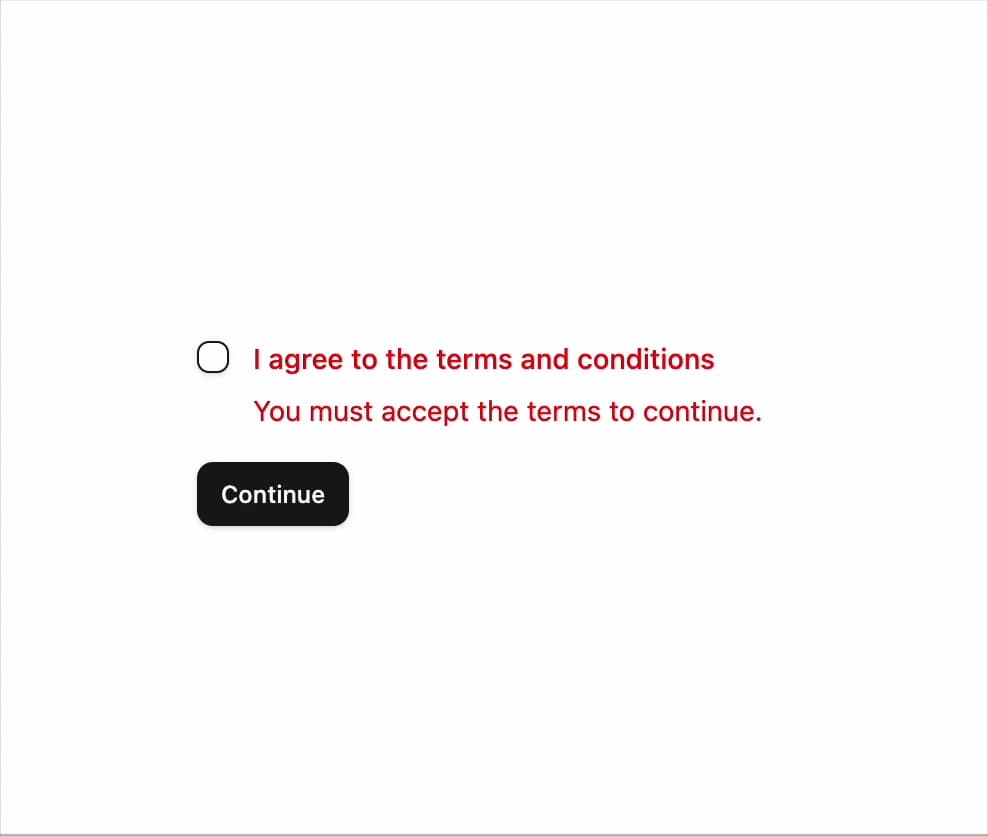
A terms-and-conditions checkbox with an inline error message that appears when the form is submitted without accepting.
Built with React and Tailwind. Copy the prompt and paste it into Claude Code, Cursor or Lovable: your agent adds Invalid / Required Checkbox to your project and fits it to your theme.
Code
How Invalid / Required Checkbox is used: the demo's code. The component's own source comes with a free account.
Usage.tsx
"use client";

import { Button } from "@/components/ui/button";
import { Checkbox } from "@/components/ui/checkbox";
import {
  Field,
  FieldContent,
  FieldError,
  FieldLabel,
} from "@/components/ui/checkbox-11-utils/field";
import { toast } from "sonner";
import { Toaster } from "sonner";
import { useState } from "react";

function Checkbox11Demo() {
  const [accepted, setAccepted] = useState(false);
  const [invalid, setInvalid] = useState(true);

  function onSubmit(event: React.FormEvent) {
    event.preventDefault();
    if (!accepted) {
      setInvalid(true);
      return;
    }
    setInvalid(false);
    toast.success("Terms accepted");
  }

  return (
    <form onSubmit={onSubmit} className="flex w-full max-w-sm flex-col gap-4">
      <Field orientation="horizontal" data-invalid={invalid}>
        <Checkbox
          id="checkbox-11-terms"
          aria-invalid={invalid}
          checked={accepted}
          onCheckedChange={(value) => {
            const next = value === true;
            setAccepted(next);
            if (next) setInvalid(false);
          }}
        />
        <FieldContent>
          <FieldLabel htmlFor="checkbox-11-terms">
            I agree to the terms and conditions
          </FieldLabel>
          {invalid && (
            <FieldError>You must accept the terms to continue.</FieldError>
          )}
        </FieldContent>
      </Field>
      <Button type="submit" size="sm" className="self-start">
        Continue
      </Button>
    </form>
  );
}

export default function DefaultDemo() {
  return (
    <div className="flex min-h-64 w-full items-center justify-center p-6">
      <Checkbox11Demo />
      <Toaster />
    </div>
  );
}
Dependencies
More by felipemenezes098
View all
Centered Hero with Image Fan
976
Editorial Collage Hero
460
Split Hero With Image Cards
417
Editorial Image Hero
394
Scroll 01
367
Real Estate Search Hero
198
Editorial Hero
180
Hero with Dashboard Mockup
128
More in Forms
View all

Contact Card
1K

Premium Auth
525

Form
16

Card Studio
41

Login 2
7

Book A Demo 3
90
Book A Demo 1
74

HeroUI Field Error
10