
About
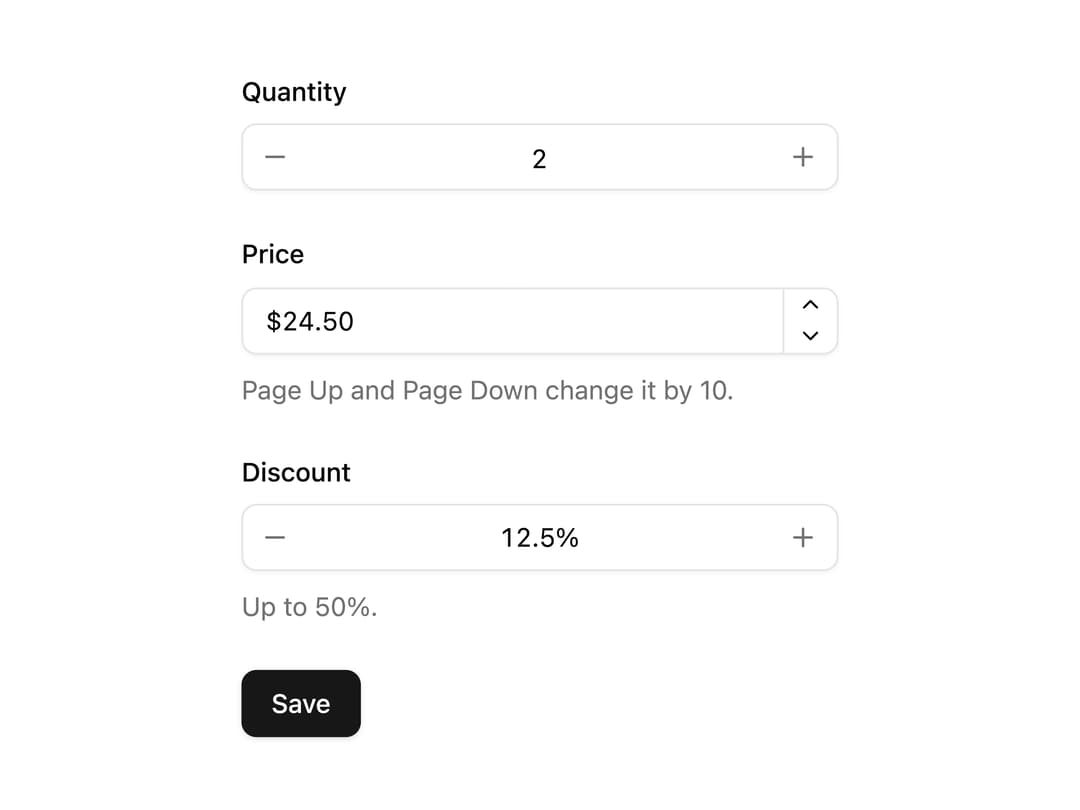
Number input with step buttons, arrow-key and hold-to-repeat stepping, min and max, and Intl formatting for currency, percent or units. Submits the raw number.
Built with React and Tailwind. Copy the prompt and paste it into Claude Code, Cursor or Lovable: your agent adds Number Field to your project and fits it to your theme.
Code
How Number Field is used: the demo's code. The component's own source comes with a free account.
Usage.tsx
"use client";

import * as React from "react";

import { Button } from "@/components/ui/button";
import {
  Field,
  FieldDescription,
  FieldGroup,
  FieldLabel,
} from "@/components/ui/field";
import NumberField, {
  NumberFieldDecrement,
  NumberFieldGroup,
  NumberFieldIncrement,
  NumberFieldInput,
  NumberFieldStepper,
} from "@/components/ui/number-field";

interface Submitted {
  quantity: string;
  price: string;
  discount: string;
}

export default function NumberFieldDemo() {
  const [submitted, setSubmitted] = React.useState<Submitted | null>(null);

  return (
    <form
      className="w-full max-w-xs"
      onSubmit={(e) => {
        e.preventDefault();
        const data = new FormData(e.currentTarget);
        setSubmitted({
          quantity: String(data.get("quantity") ?? ""),
          price: String(data.get("price") ?? ""),
          discount: String(data.get("discount") ?? ""),
        });
      }}
    >
      <FieldGroup className="gap-6">
        <Field className="gap-2">
          <FieldLabel htmlFor="nf-quantity">Quantity</FieldLabel>
          <NumberField
            id="nf-quantity"
            name="quantity"
            defaultValue={2}
            min={1}
            max={20}
            precision={0}
          >
            <NumberFieldGroup>
              <NumberFieldDecrement />
              <NumberFieldInput />
              <NumberFieldIncrement />
            </NumberFieldGroup>
          </NumberField>
        </Field>

        <Field className="gap-2">
          <FieldLabel htmlFor="nf-price">Price</FieldLabel>
          <NumberField
            id="nf-price"
            name="price"
            defaultValue={24.5}
            min={0}
            step={0.5}
            largeStep={10}
            formatOptions={{ style: "currency", currency: "USD" }}
          >
            <NumberFieldGroup>
              <NumberFieldInput />
              <NumberFieldStepper />
            </NumberFieldGroup>
          </NumberField>
          <FieldDescription>
            Page Up and Page Down change it by 10.
          </FieldDescription>
        </Field>

        <Field className="gap-2">
          <FieldLabel htmlFor="nf-discount">Discount</FieldLabel>
          <NumberField
            id="nf-discount"
            name="discount"
            defaultValue={12.5}
            min={0}
            max={50}
            step={0.5}
            largeStep={5}
            formatOptions={{
              style: "unit",
              unit: "percent",
              maximumFractionDigits: 1,
            }}
          >
            <NumberFieldGroup>
              <NumberFieldDecrement />
              <NumberFieldInput />
              <NumberFieldIncrement />
            </NumberFieldGroup>
          </NumberField>
          <FieldDescription>Up to 50%.</FieldDescription>
        </Field>

        <div className="flex flex-col gap-3">
          <Button type="submit" className="w-fit">
            Save
          </Button>
          {submitted && (
            <p className="text-sm text-muted-foreground tabular-nums">
              {`Sent quantity ${submitted.quantity}, price ${submitted.price}, discount ${submitted.discount}`}
            </p>
          )}
        </div>
      </FieldGroup>
    </form>
  );
}
Dependencies
More by Mohammad Shehadeh
View all
Feature Problem Cards
91
Feature Grid Spotlight Cards
74
Ecommerce Category Page
73
Split Login
70
Comparison Section
66
Dithered Shader CTA
65
Comparison Table
64
FAQ Two Column
64
More in Forms
View all

Premium Auth
525

Contact Card
1K

Login 2
8

Card Studio
41

Form
16

Book A Demo 1
74

HeroUI Field Error
10
Book A Demo 3
90